Smooth Spins Mobile App — Full Casino Access on Any Device

Smooth Spins Casino runs entirely in your mobile browser - no download required. Every slot, live table and bingo room available on the desktop site works on iOS and Android. The platform is built on BVGroup technology, the same stack behind Heart Bingo and JackpotCity Casino, optimised for touch screens and fast mobile connections. Deposits start from £5, withdrawals via Visa FastFunds arrive in around 40 minutes, and the UKGC licence number 39576 covers every session.

Join Smooth Spins — welcome offer for new UK players
Registerwith bonus

Why Play Through the Mobile Version

The browser-based approach means you never wait for an app store approval or a large file download. Open smoothspins.co.uk on Safari or Chrome, log in, and you are inside the full casino within seconds. BVGroup engineered the platform to match desktop functionality on screen sizes from 4 inches upward - swipe navigation, tap-to-spin controls and pinch-zoom on game previews all work without extra configuration.

Key advantages over a standalone app:

  • Always on the latest version - no manual updates
  • Full 1,500+ game catalogue including live dealers and bingo
  • Same UKGC-protected account and payment methods
  • Geolocation check confirms UK residency at login, satisfying regulatory requirements

For Android users there is also a Progressive Web App (PWA) option that adds a home-screen icon and requests location permission on first launch. iOS users play directly through Safari with no installation step needed.

Visit Smooth Spins Casino
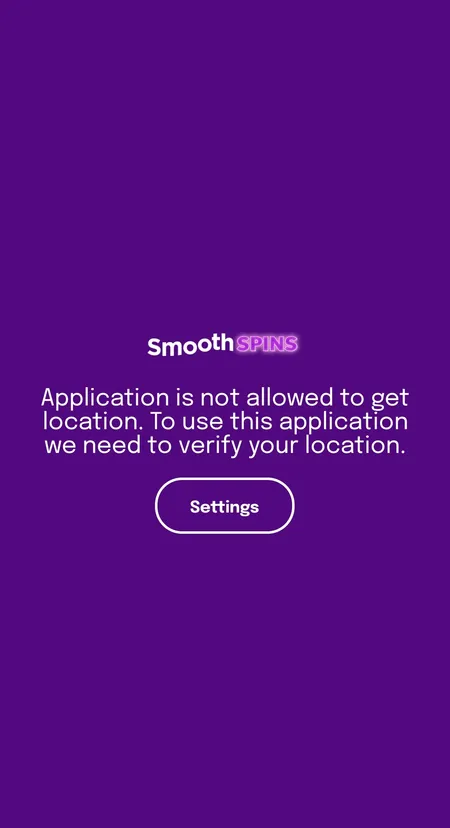
Smooth Spins app geolocation permission screen

On Android the app requests location access to confirm UK residency. Without this the session cannot start. Tap 'Allow' and the casino loads immediately.

How to Add Smooth Spins to Your Home Screen

Android - Progressive Web App

  1. Open Chrome and go to smoothspins.co.uk
  2. Tap the three-dot menu in the top right corner
  3. Select 'Add to Home screen' and confirm
  4. The PWA icon appears on your home screen like a native app
  5. On first launch grant the location permission when prompted

No APK file is distributed through third-party stores. Download only from the official .co.uk domain to avoid modified builds.

iOS - Safari Web App

  1. Open Safari and navigate to smoothspins.co.uk
  2. Tap the Share button (box with arrow) at the bottom of the screen
  3. Choose 'Add to Home Screen' and tap 'Add'
  4. The icon is now on your home screen; tap it to open in full-screen mode

There is no App Store listing. The web app runs through Safari's WebKit engine, which supports all HTML5 game content used by providers such as Pragmatic Play, Evolution and Blueprint Gaming.

System Requirements and Compatibility

Requirement Android iOS
Minimum OS version Android 8.0 iOS 14
Recommended browser Chrome 90+ Safari 14+
Minimum RAM 2 GB 2 GB
Internet connection 4G or Wi-Fi 4G or Wi-Fi
Storage (PWA icon) Under 1 MB Under 1 MB

All game content streams from the provider servers, so the device itself does not store game files. A stable 4G connection is sufficient for live dealer tables; slots load comfortably on standard 3G where signal is consistent.

Play Now at Smooth Spins

Creating an Account Inside the Mobile Browser

Registration takes roughly 2 minutes and follows the same three-step flow whether you are on desktop or mobile. The form is fully touch-optimised with large input fields and inline validation shown with a green tick.

Registration Steps on Mobile

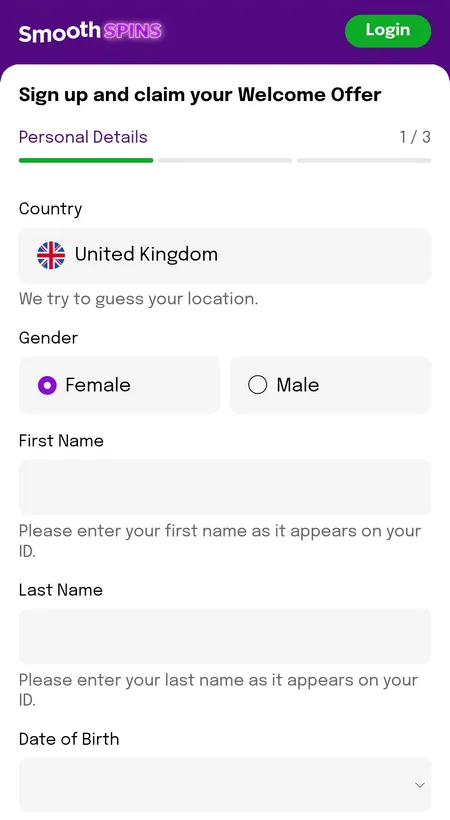
  1. Step 1 personal details form

    Step 1 - Personal Details. Enter your gender, full name as it appears on your ID, date of birth and UK mobile number starting with +44. All fields validate in real time.

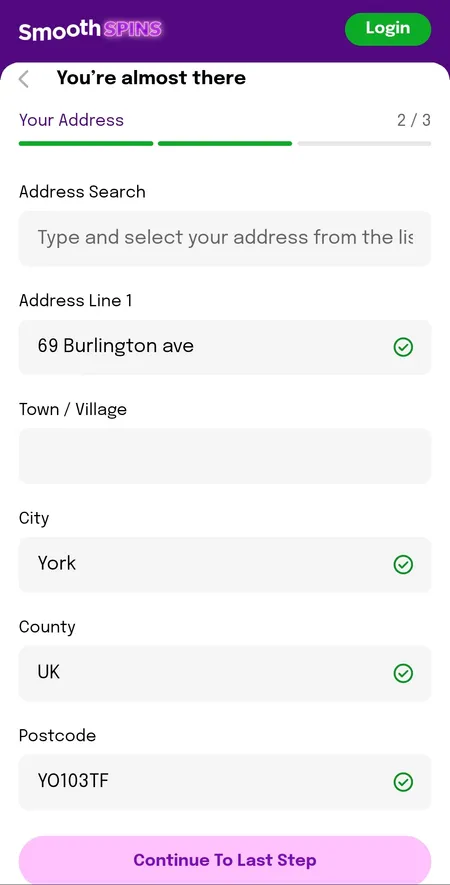
  2. Step 2 address lookup form

    Step 2 - Your Address. Search by postcode or enter address line, town, city, county and postcode manually. The lookup tool auto-fills most UK addresses.

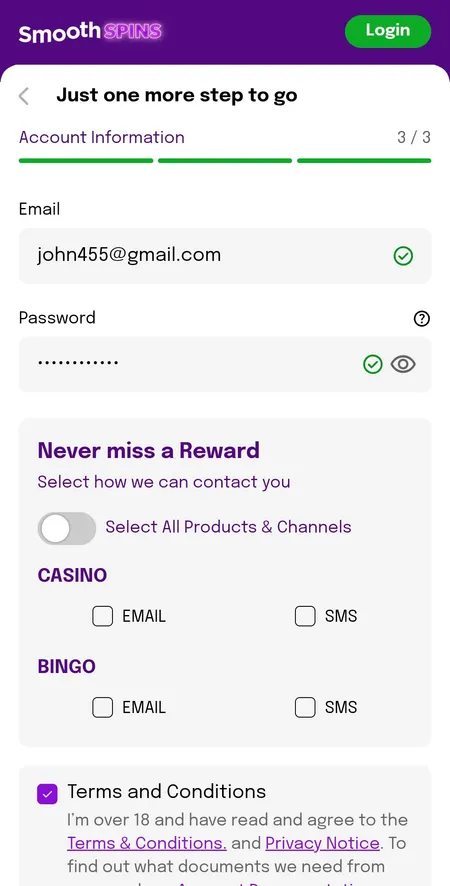
  3. Step 3 email and marketing preferences

    Step 3 - Account Information. Enter your email, set a password and choose marketing preferences for Casino and Bingo by email or SMS. Accept the Terms and confirm you are 18+.

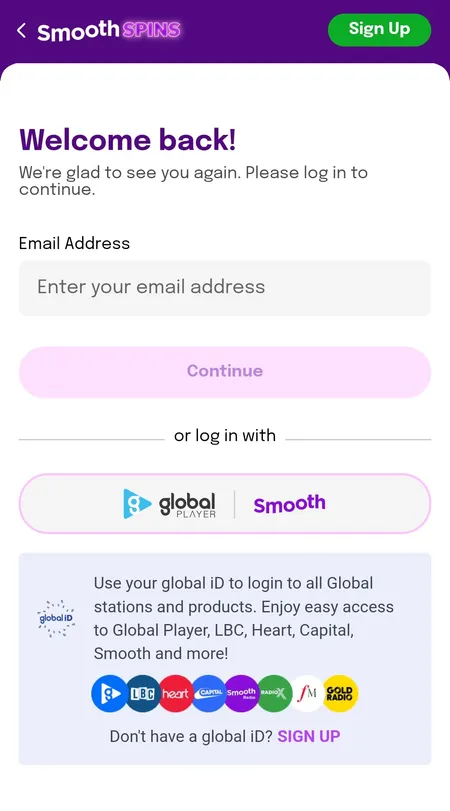
After the account is created you can log in with email and password or use your existing Global iD - a single sign-on shared with Heart, Capital, LBC and other Global Radio brands. See the Smooth Spins home page for the full overview of the casino, including bonus terms and payment details.

Smooth Spins login screen with email and Global iD options

The login screen offers two routes: standard email plus password, or one-tap Global iD for listeners already registered with a Global Radio brand.

Managing Your Account on Mobile

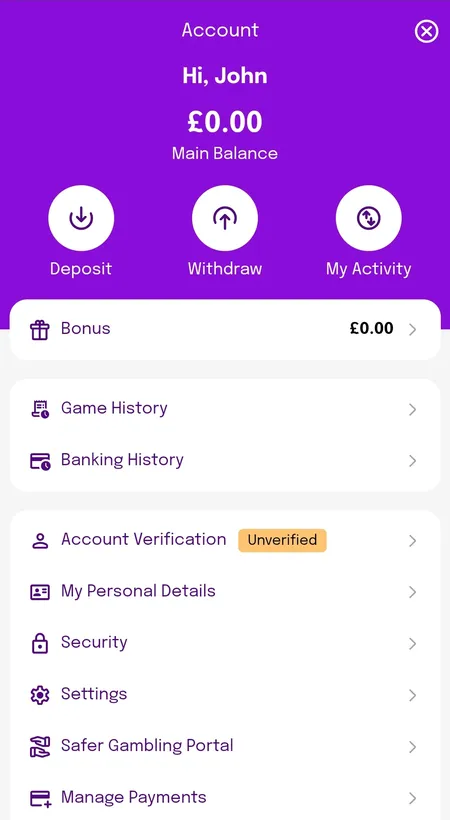
The account dashboard is designed for one-handed use. After logging in, the top bar shows your Main Balance and Bonus balance separately, with quick-action buttons for Deposit, Withdraw and My Activity.

From the same screen you can:

  • Review Game History and Banking History
  • Start or complete KYC verification (shown as orange 'Unverified' badge until complete)
  • Set deposit limits - Daily, Weekly or Monthly - with changes taking effect immediately; increases require a 24-hour waiting period
  • Access the Safer Gambling Portal for self-exclusion or time-outs
Smooth Spins account dashboard showing balance and menu

The mobile account screen displays main balance, bonus balance and quick links to deposit, withdraw and activity history.

Open Your Account

Bonuses Available Through the Mobile Version

All promotions work identically on mobile and desktop. The Smooth Spins welcome bonus gives new players up to 150 free spins on Age of the Gods: God of Storms 2 or 3 after depositing and wagering £10 on any game except blackjack or roulette within 7 days of registration. Winnings from the free spins are paid as cash with no wagering requirement.

Ongoing promotions accessible on mobile include:

  • Spin to Win Wheel - daily spin for free spins or cash prizes
  • Mega Hits Wheel - available after wagering £20 on selected slots
  • Bingo Rewards Club - up to 670 bingo tickets per week
  • Pragmatic Play Drops and Wins - random prize drops across eligible slots

From January 2026, bonus wagering requirements on Smooth Spins are capped at 10x, well below the UK market average.

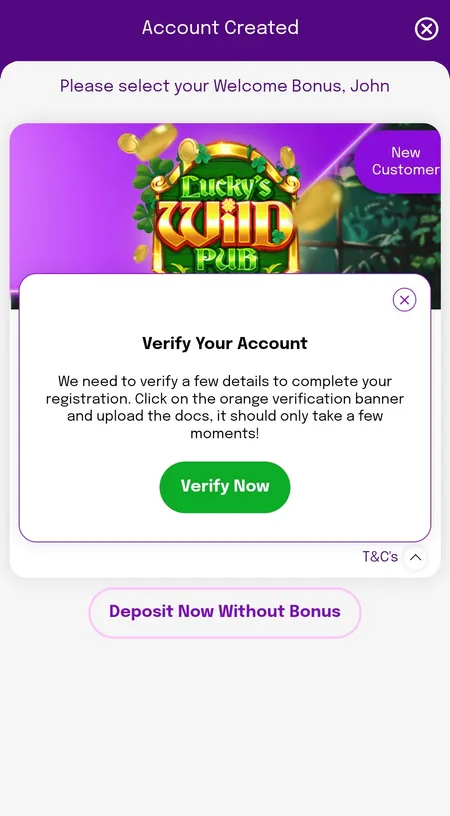
Post-registration screen showing welcome bonus and verification prompt

After registration the platform shows the welcome offer and an optional prompt to start KYC verification. Verification is required before withdrawals.

Deposits and Withdrawals on Mobile

The mobile cashier supports the same methods as desktop. All transactions are in GBP with no conversion fees.

Method Deposit Speed Withdrawal Speed Min
Visa Debit (FastFunds) Instant ~40 minutes £5
Mastercard Debit Instant 2-5 working days £5
Apple Pay Instant Up to 3 days £5
Google Pay Instant Up to 3 days £5
Bank Transfer Up to 3 days Up to 5 working days £5

Credit cards are not accepted in line with UK gambling law. The maximum withdrawal per transaction is £5,000; larger amounts may require additional UKGC compliance checks. There are no withdrawal fees.

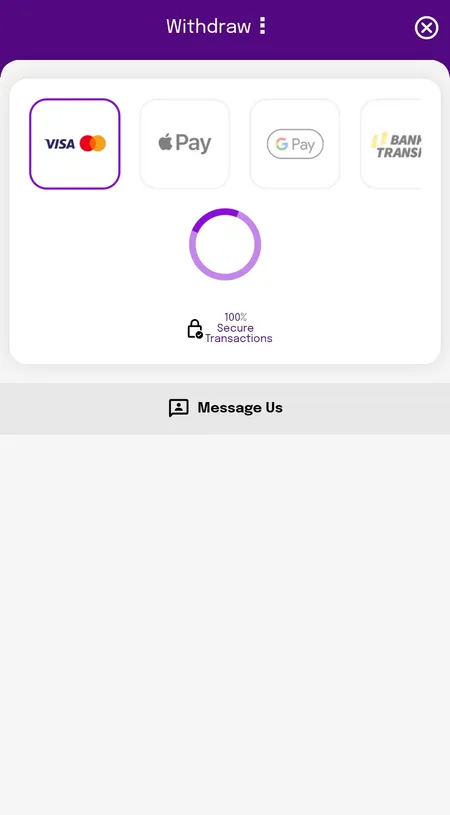
Smooth Spins withdrawal methods screen on mobile

The mobile withdrawal screen lists Visa, Mastercard, Apple Pay, Google Pay and bank transfer. All transactions are marked as 100% secure.

Deposit and Start Playing

Games Available on Mobile

All 1,500+ titles in the Smooth Spins catalogue are available on mobile without any compromise in quality. The lobby loads with large game thumbnails, easy swipe navigation and a search bar at the top.

Categories accessible on mobile:

  • Slots - classic, video, Megaways, branded titles from Pragmatic Play, Blueprint, NetEnt, Play'n GO and 50+ other providers
  • Live Casino - Evolution and Pragmatic Live tables including Crazy Time, Immersive Roulette and Lightning Blackjack
  • Bingo - 20+ rooms on Playtech Bingo platform including Deal or No Deal Bingo and Penny Play
  • Slingo - Rainbow Riches Slingo, DaVinci Diamonds, Shark Week and dozens more
  • Jackpots - Trophy Fish, Dynamite Riches, Rainbow Jackpots

The only current limitation is that filtering by specific provider is not available in the mobile lobby; use the search bar to find titles from a particular studio.

All games use RNG certified by eCOGRA and all sessions are protected by SSL encryption.

Big Bass Reel Repeat slot
Big Bass Reel Repeat
Play
Eye of Horus Tablets of Destiny Megaways slot
Eye of Horus Megaways
Play
Sweet Bonanza Super Scatter slot
Sweet Bonanza Super Scatter
Play
Secrets of the Phoenix slot
Secrets of the Phoenix
Play

Security on Mobile

Smooth Spins uses SSL encryption on every page and transaction, the same standard applied across the full BV Gaming Limited network including BetVictor. Player funds are held in segregated accounts at the Medium level required by the UKGC.

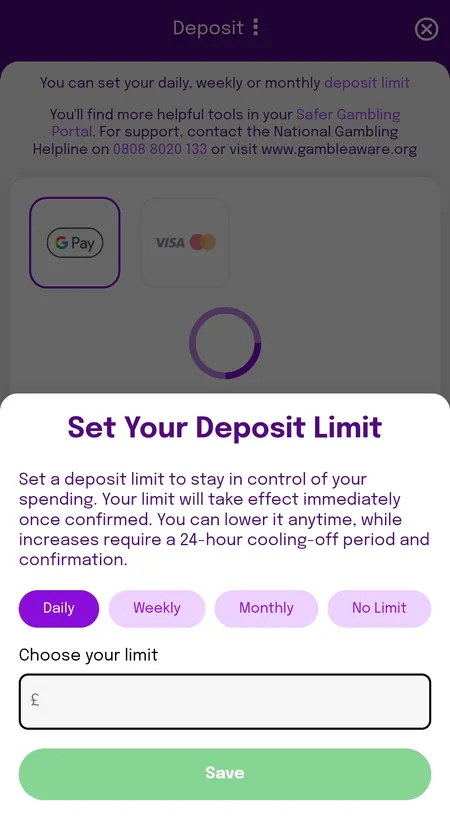
The deposit limit screen appears on first deposit and lets you set a Daily, Weekly or Monthly cap. Increasing the limit requires a 24-hour cooling-off period and re-confirmation - this applies on mobile and desktop identically.

If you need further support the National Gambling Helpline is available free on 0808 8020 133, and links to GamStop, GamCare and GambleAware are in the Safer Gaming section at the bottom of every page.

Smooth Spins deposit limit setting screen

The deposit limit modal appears at first deposit. Limits take effect immediately; increases require a 24-hour delay in line with UKGC responsible gambling rules.

Keeping the Mobile Version Up to Date

Because Smooth Spins runs as a browser app rather than a native application, updates are handled server-side. You always access the latest version simply by opening the site. There is nothing to download, no version conflicts and no notification to dismiss before playing.

If you installed the PWA shortcut on Android and notice any loading issues after a major platform update, clearing the browser cache in Chrome settings resolves most problems. On iOS, clearing Safari website data achieves the same result.

Smooth Spins is operated by BV Gaming Limited under UKGC licence 39576. All games carry eCOGRA RNG certification. Player funds are held in segregated accounts. The platform is the same proven technology stack that powers Heart Bingo and JackpotCity Casino.

Smooth Spins does not offer sports betting. The platform covers slots, live casino, bingo and Slingo only. There is currently no standalone app in the Google Play Store or Apple App Store.

FAQ

Is there a Smooth Spins app to download?

There is no listing in the App Store or Google Play. On Android you can add a PWA shortcut from Chrome. On iOS you add the site to your home screen from Safari. Both options give a full-screen experience with access to all games.

Does the mobile version include all games?

Yes. All 1,500+ titles available on desktop are playable on mobile, including live dealer tables from Evolution and Pragmatic Live, Playtech Bingo rooms and Slingo.

Why does the app ask for my location?

Smooth Spins holds a UKGC licence and is available to UK residents only. The geolocation check at login confirms you are accessing the site from within the United Kingdom. The check takes a few seconds and does not store your precise coordinates.

Can I claim the welcome bonus through mobile?

Yes. The welcome offer of up to 150 free spins is available on mobile. Deposit £10, wager it on any eligible game within 7 days, and the spins are credited to your account.

How fast are mobile withdrawals?

Visa FastFunds typically delivers funds in around 40 minutes after approval. Apple Pay and Google Pay can take up to 3 days. Bank transfer takes up to 5 working days. There are no withdrawal fees on any method.

What is the minimum deposit on mobile?

The minimum deposit is £5 for a standard deposit and £10 to qualify for the welcome bonus.

Is my payment information safe on mobile?

All payment data is protected by SSL encryption and processed through UKGC-approved payment gateways. Smooth Spins holds player funds in segregated accounts and undergoes regular independent audits.

Can I set responsible gambling limits on mobile?

Yes. From the Account menu tap Settings to access the Safer Gambling Portal where you can set deposit limits, session reminders, time-outs or apply for self-exclusion through GamStop.

Final Notes on the Mobile Experience

Smooth Spins Casino delivers a consistent, well-optimised experience across phones and tablets without requiring any installation. The BVGroup platform loads quickly, navigation is clean and every UKGC-mandated tool including deposit limits, session reminders and self-exclusion is accessible from the mobile account screen. For full details on smooth spins sign up including the step-by-step registration guide, visit the dedicated page.

Smooth Spins is ready on your phone right now. Open the site in your browser, register in 2 minutes and use your first £10 deposit to claim up to 150 free spins.