Register at Smooth Spins in Minutes and Claim Your Sign-Up Offer

Smooth Spins Casino launched in April 2025 under UKGC licence 39576, operated by BV Gaming Limited. Registration takes under 2 minutes, requires no promo code, and immediately unlocks up to 150 free spins on your first £10 deposit. This guide walks you through every screen - from the sign up form to KYC verification and your welcome offer.

Join Smooth Spins — welcome offer for new UK players
Registerwith bonus

Who Can Register at Smooth Spins

Before opening the form, check you meet the basic eligibility criteria:

  • UK resident aged 18 or over
  • Valid UK address and mobile number with +44 prefix
  • Unique email address not already linked to a BV Gaming account
  • Willingness to complete KYC before withdrawing

Smooth Spins accepts only UK players and processes all transactions in GBP. Credit cards are banned under UK law - only debit cards are accepted. If you already hold a Global iD (used for Heart Radio, Capital, LBC and other Global brands), you can log in with that instead of creating new credentials.

Registration is free, no promo code is needed, and the welcome offer activates automatically once you deposit and wager £10 on any game except blackjack or roulette.

Where to Find the Sign Up Button

On desktop, the green 'Join' or 'Register' button sits in the top-right corner of every page. On mobile, the same button appears in the sticky header. Inside the app, the button is on the welcome screen before login. All routes lead to the same three-step form.

Open Registration Form

The Three-Step Registration Form

Smooth Spins uses a clean three-screen flow designed to work on any device.

Step-by-Step Sign Up Process

  1. Step 1 personal details form Smooth Spins

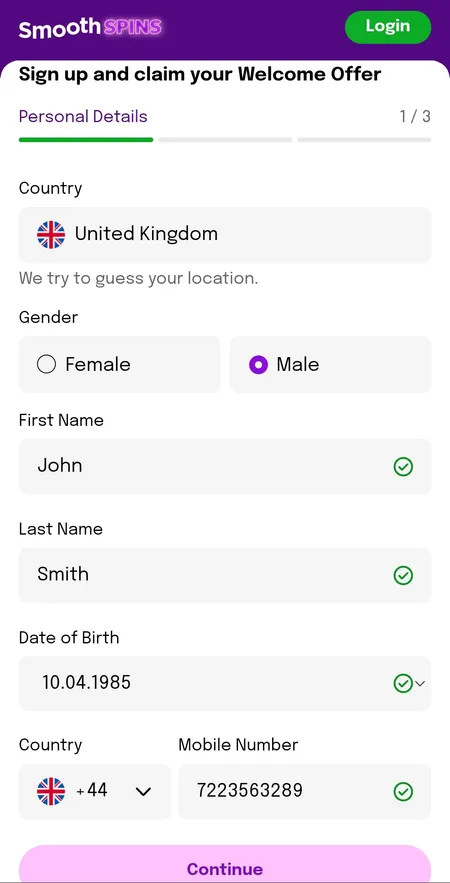
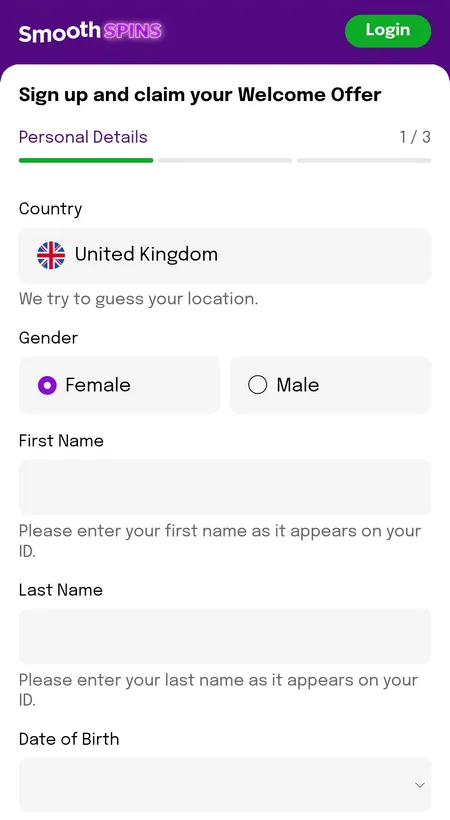
    Step 1 - Personal Details. Select United Kingdom as your country. Enter your gender, first name and surname exactly as they appear on your ID document. Add your date of birth and a UK mobile number starting with +44. Fields turn green when the input is valid.

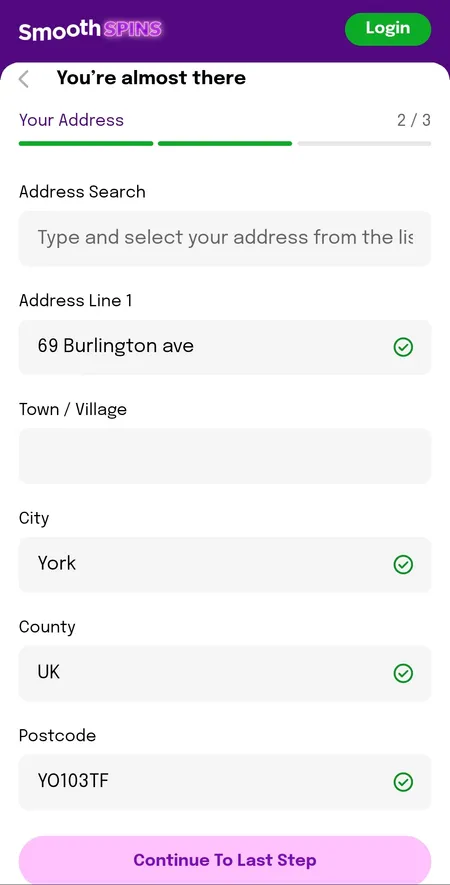
  2. Step 2 address entry Smooth Spins registration

    Step 2 - Your Address. Type the first line of your address or postcode into the search field. Select your property from the dropdown, then confirm Address Line, Town, City, County and Postcode. Accurate address data speeds up KYC later.

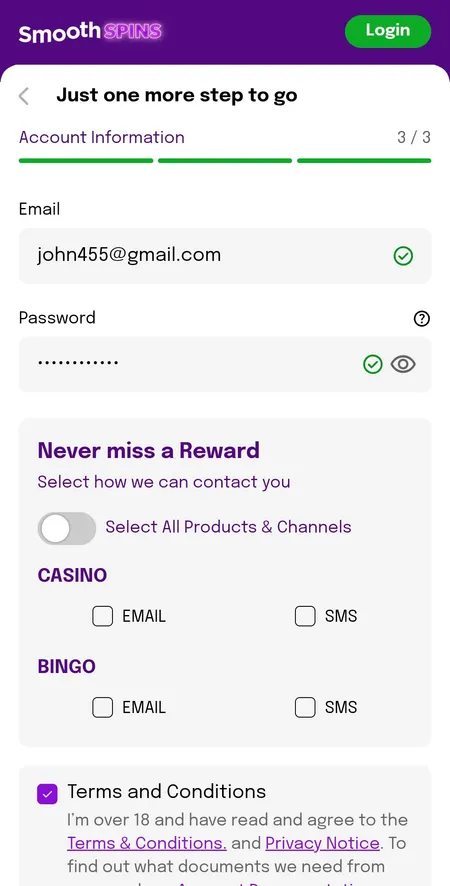
  3. Step 3 email password and marketing preferences

    Step 3 - Account Information. Enter your email address and create a password (use the eye icon to check it). Choose whether to receive Casino and Bingo rewards by EMAIL or SMS. Tick the 18+ checkbox to accept the Terms and Conditions and Privacy Notice, then submit.

After the Form: Welcome Offer and Verification Prompt

Once the form is submitted you land on the Account Created screen. Here you choose between two paths:

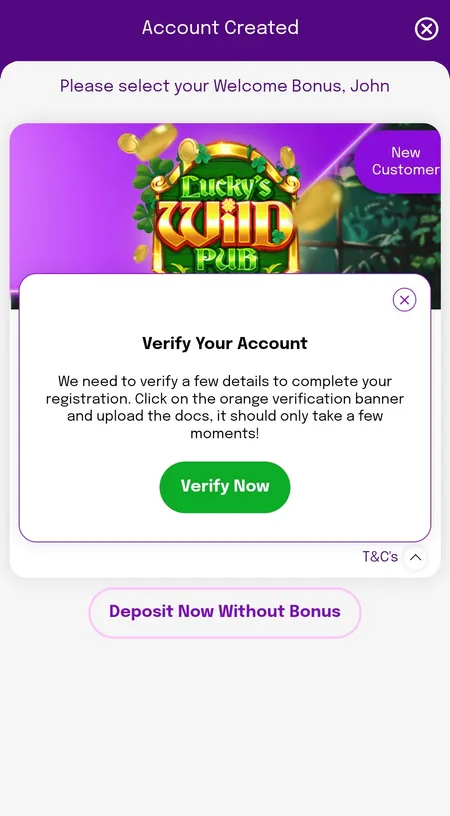
Post-registration screen showing welcome bonus and verify account prompt

After sign up you can select your welcome offer or deposit without a bonus. An orange Verify Your Account banner may appear immediately - completing this now avoids delays when you request your first withdrawal.

The welcome offer options have included up to 150 free spins on Age of the Gods: God of Storms 2 or 3, and 200 free spins on Bee Keeper, both triggered by a £10 deposit and £10 wager. Each free spin is worth £0.10. Winnings from free spins are paid as real cash with no wagering requirement attached - a genuine advantage over most UK casinos. If bonus wagering does apply to cash bonuses, UKGC rules cap it at 10x from January 2026.

After choosing your offer, the cashier opens automatically. Deposit a minimum of £5 (or £10 to unlock the bonus), place your wager, and the spins are credited instantly.

For more details on current promotions, visit the Smooth Spins bonuses page.

Claim Your Welcome Offer

KYC Verification: What to Prepare

UKGC rules require identity verification before you can withdraw. You can complete KYC straight after registration or wait until you request a payout - but doing it early avoids any hold on your funds.

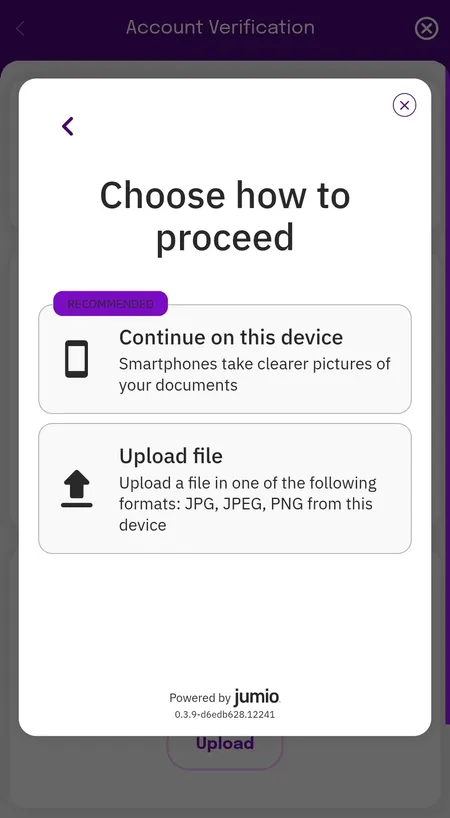
Jumio KYC screen showing device capture or file upload options

Smooth Spins uses Jumio for document verification. You can take a live photo on your device (recommended) or upload a JPG, JPEG or PNG file from your gallery.

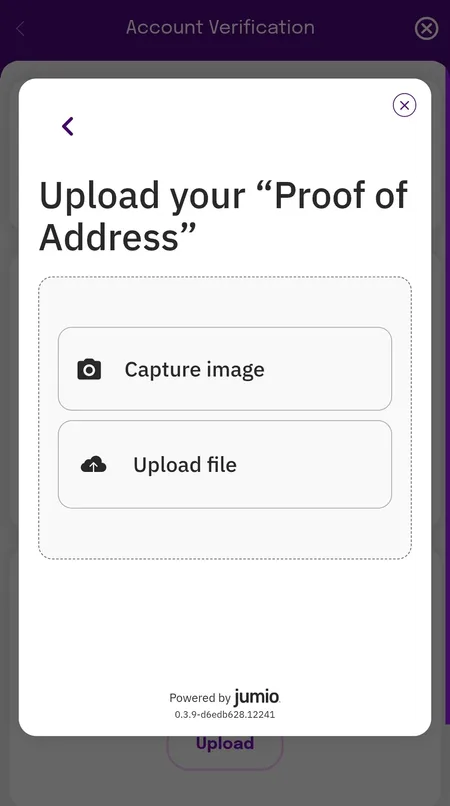
Address verification upload screen for KYC

Proof of address must be dated within the last 3 months - a utility bill, bank statement or official government letter all qualify.

Documents accepted:

Document type Accepted formats
Identity Passport, driving licence, national ID
Address proof Utility bill, bank statement (max 3 months old)

Verification normally completes within 24 hours. Until it is approved, the Account Verification screen will show Deposit, Withdraw and Play as restricted. The orange 'Unverified' badge in your account disappears once all checks pass.

Registering via the Mobile App

Smooth Spins offers a fully optimised mobile experience for iOS and Android. The sign up flow is identical to the web version. On Android, the app may request location permission on first launch - this is required by UKGC geo-compliance rules and cannot be bypassed.

For a full guide on installing and using the casino on your phone, see the Smooth Spins app page.

Filled step 1 registration form on mobile

Mobile autofill works on both iOS and Android, making it faster to complete the personal details screen.

Register on Mobile

Your Account Dashboard After Sign Up

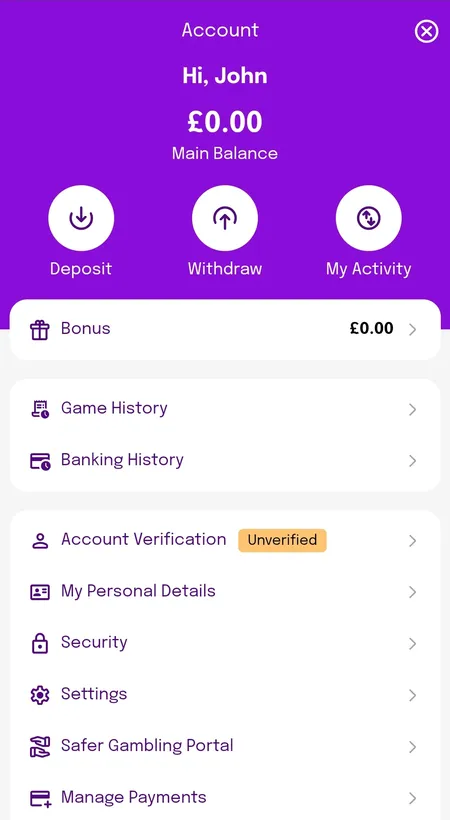
Once verified, your account dashboard shows your Main Balance and Bonus balance separately, with quick-access buttons for Deposit, Withdraw and My Activity. You can review Game History, set responsible gambling limits, and manage payment methods all from one screen.

Smooth Spins account dashboard showing main and bonus balances

The dashboard separates real money and bonus funds clearly. Deposit limit settings are accessible immediately after sign up - UKGC rules mean any increase takes 24 hours to activate.

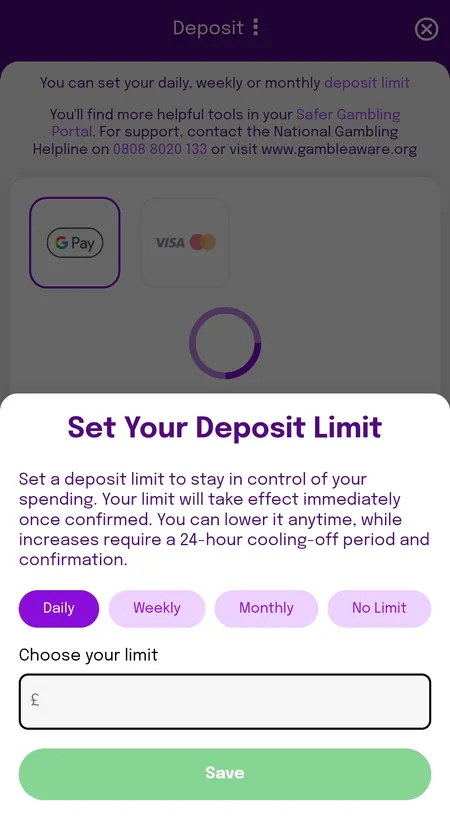
Setting a deposit limit on Smooth Spins after registration

You can set Daily, Weekly or Monthly deposit limits during or after registration. Reductions apply immediately; increases require a 24-hour cooling-off period.

Security and Responsible Gambling Settings

Smooth Spins uses SSL encryption across the entire site, and all player funds are held in segregated accounts as required by UKGC's medium-level fund protection standard. Passwords must be strong enough to pass built-in validation - check them with the eye icon before submitting.

After sign up, you can enable:

  • Deposit, loss and wager limits (Daily / Weekly / Monthly)
  • Session reminders that require active dismissal
  • Time-out periods
  • Self-exclusion via GamStop

The free National Gambling Helpline number (0808 8020 133) and links to GambleAware and GamCare are in the Safer Gambling section at the bottom of every page.

Smooth Spins is one of the newer UK casinos but builds on BV Gaming's established infrastructure - the same platform powers Smooth Spins Casino, Heart Bingo and JackpotCity Casino, all under UKGC licence 39576.
Only UK residents aged 18 and over can register. Credit cards are not accepted under UK gambling law. All accounts are subject to mandatory KYC before withdrawals are processed.

Sign Up FAQ

How long does registration take?

The three-step form takes approximately 2 minutes to complete. You can start playing as soon as your first deposit clears, which is instant for debit cards and Apple/Google Pay.

Do I need a promo code to get the welcome offer?

No promo code is required. The welcome offer activates automatically when you deposit and wager £10 on eligible games within 7 days of creating your account.

Can I sign up with Global iD?

Yes. If you already have a Global iD linked to Smooth Radio, Heart, Capital or another Global brand, you can use it to log in without creating separate credentials.

Why is my mobile number not being accepted?

Make sure you are using a UK number with the +44 country code and that the number has not already been registered on another BV Gaming account.

When do I need to complete KYC?

KYC is mandatory before any withdrawal. You can complete it immediately after registration using Jumio - upload a passport or driving licence plus proof of address dated within 3 months.

What happens to my free spins if I do not wager £10 in time?

The welcome spins are only awarded after you wager £10 on qualifying games within 7 days. If you miss this window the offer expires and cannot be reinstated.

Can I set deposit limits during registration?

Yes. A deposit limit prompt may appear during your first deposit. You can also set limits at any time from the account dashboard under Settings.

What do I do if the verification email does not arrive?

Check your spam folder first. If it is not there after a few minutes, use the resend option on the confirmation screen or contact the 24/7 live chat.

Your Smooth Spins account is one short form away. Complete sign up in under 2 minutes, deposit £10 and start spinning with your welcome free spins - no promo code needed.